ESP32 • BEGINNER TO PROJECT BUILDER
YKR038 ESP32 Starter Kit Course
Learn ESP32 programming through 36 practical, step-by-step tutorials using the components in your Zepkvor YKR038 Starter Kit.
COURSE OVERVIEW
Start with the basics. Finish with connected projects.
This learning path moves from safe wiring and first code to sensors, OLED graphics, motion control, Wi-Fi, and a complete smart-room project. Each lesson focuses on one clear outcome before combining skills in larger builds.
USE YOUR OWN KIT
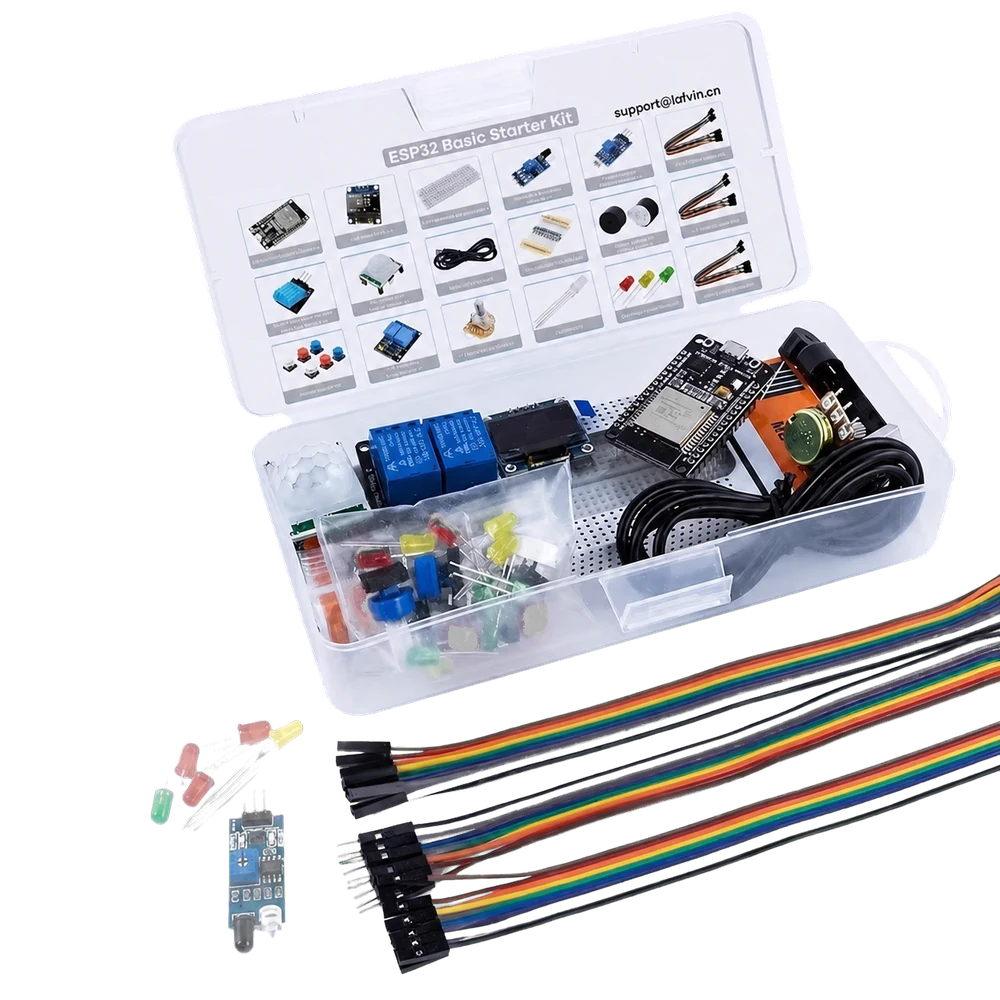
One kit, a complete learning path
The curriculum is designed around the YKR038 board, sensors, display, output modules, breadboard, and connecting parts. Component callouts on every lesson help you prepare before you start.
COURSE CURRICULUM
36 step-by-step ESP32 tutorials
Lesson pages will be linked here only after their written guide, images, code, and video are ready.
Getting Started
Build a reliable foundation before wiring your first project.
Meet the YKR038 ESP32 Starter Kit
Identify the board, modules, and accessories, and learn how this course is organized.
Install Arduino IDE and ESP32 Board Support
Prepare Arduino IDE and install the correct ESP32 board package.
Connect and Test the ESP32 Development Board
Choose the board and port, then upload a simple hardware test.
Understand the Breadboard and Jumper Wires
Learn power rails, connected rows, polarity, and safe prototyping habits.
Write Your First ESP32 Sketch
Understand setup, loop, variables, pin modes, and the upload workflow.
Use the Serial Monitor for Debugging
Print useful data and diagnose common wiring and upload problems.
LEDs, Sound & Display
Create visible and audible output with simple ESP32 circuits.
Blink an External LED
Wire an LED safely and control it with a digital output.
Control LED Brightness with PWM
Use ESP32 PWM to fade an LED smoothly.
Build a Traffic Light
Sequence red, yellow, and green LEDs with reusable timing logic.
Create Colors with an RGB LED
Mix red, green, and blue channels to generate custom colors.
Play Tones with an Active Buzzer
Create alerts and status sounds from a digital output.
Create Melodies with a Passive Buzzer
Generate frequencies and program a short melody.
Display Text on the OLED
Connect the OLED and show text, numbers, and simple graphics.
Build an OLED Sensor Dashboard
Design a clear screen layout ready for live sensor values.
Buttons & Analog Inputs
Read user input and convert analog signals into useful control.
Read a Push Button
Build a stable digital input circuit and read button states.
Toggle an LED with a Button
Change an output state with each button press.
Debounce a Push Button
Prevent false presses with reliable software debouncing.
Read a Potentiometer
Measure an analog voltage and inspect the value in Serial Monitor.
Dim an LED with a Potentiometer
Map analog input values to PWM brightness.
Build an Automatic Night Light
Use a photoresistor to switch an LED as ambient light changes.
Sensors & Detection
Turn temperature, motion, distance, sound, flame, water, and vibration into data.
Measure Temperature and Humidity
Read DHT11 data and handle invalid sensor values.
Detect Motion with a PIR Sensor
Tune and read a PIR sensor for presence detection.
Measure Distance with HC-SR04
Calculate distance from ultrasonic echo timing.
Build an Ultrasonic Parking Sensor
Combine distance measurements with visual and audible alerts.
Detect Sound with a Microphone Sensor
Respond to claps or other sharp changes in sound level.
Detect Flame Safely
Read a flame sensor and build a demonstration alarm.
Detect Water
Use a water sensor to create a basic leak warning.
Detect Vibration and Tilt
Turn movement into a reliable digital event.
Read Analog Sensors Accurately
Improve ESP32 analog readings with averaging and calibration.
Motion & Control
Control physical outputs and combine components into useful systems.
Control a Servo Motor
Set servo angles and create a smooth sweep.
Build a Sensor-Controlled Servo
Map sensor data to servo movement for an interactive mechanism.
Create a Multi-Sensor Alarm
Combine several inputs with LED, buzzer, and display feedback.
Wi-Fi & Final Projects
Connect the kit to the web and bring your skills together.
Connect ESP32 to Wi-Fi
Join a wireless network and monitor connection status safely.
Create an ESP32 Web Server
Control an output from a responsive browser page.
Build a Wi-Fi Sensor Dashboard
Publish live sensor readings on your local network.
Final Project: Smart Room Monitor
Combine sensing, display, alerts, and Wi-Fi in a complete project.
HOW THE COURSE WORKS
Text, images, code, and video—together
Prepare
Check the required parts, wiring notes, and lesson goal.
Build
Follow clear circuit photos and step-by-step written instructions.
Program
Upload explained code and understand the important lines.
Verify
Use the video and troubleshooting guide to confirm the result.
COURSE RESOURCES
Downloads will appear with each lesson
Arduino sketches, wiring references, parts lists, and supporting files will be added only when their lesson page is published, so every download stays current and useful.
FREQUENTLY ASKED QUESTIONS
Before you begin
Is this course suitable for a complete beginner?
Yes. The first module covers the software, board connection, breadboard, wiring, basic code, and debugging before any larger project.
Do I need the YKR038 kit?
The lessons are written and tested for the Zepkvor YKR038 ESP32 Starter Kit. Similar parts may work, but pin labels, wiring, and results can differ.
Will every tutorial include code and video?
Each finished lesson is planned to include English written instructions, circuit or project images, explained code, and a supporting video.
Why are lesson cards not clickable yet?
We avoid sending learners to incomplete or missing pages. A lesson will become clickable when its complete tutorial is published.
BUILD WITH CONFIDENCE
Your YKR038 learning journey starts here
Bookmark this course hub and return as the 36 tutorials are published.
Course lessons coming soon